Starting a pathology lab in India requires more than just buying machines. You need the right licences, space, staff, equipment, workflow and laboratory software to run the lab smoothly.
This guide explains the basic requirements in simple language.
1. Starting a Pathology Lab in India
Before starting your lab, you need to plan the basic setup.
Who Can Start a Pathology Lab?
A pathology lab can be started by healthcare professionals, diagnostic centre owners, hospitals or other eligible businesses.
However, testing and reporting must be handled by properly qualified professionals as required by applicable rules.
The exact requirements can vary from one state to another, so check the rules that apply to your location before starting.
Registrations and Licences
Depending on your location and the services you provide, you may need registrations and approvals related to:
● Clinical establishment
● Local authority/municipality
● Biomedical waste
● Fire and safety
● Tax and business registration
● Other applicable healthcare requirements
If you want to follow a particular accreditation standard, you will also need to meet its requirements.
Space for the Lab
Your lab should have enough space for:
● Reception and billing
● Sample collection
● Testing
● Sample processing
● Equipment
● Storage
● Staff
● Biomedical waste handling
The layout should allow samples to move easily from collection to testing and reporting.
Staff
Depending on the size of your lab, you may need:
● Pathologist or qualified reporting professional
● Lab technicians
● Sample collection staff
● Receptionist
● Billing staff
● Lab manager or administrator
2. Pathology Lab Equipment
The equipment you need depends on the tests you want to offer. Some commonly used equipment includes:
Hematology Analyzer
Used for blood tests such as CBC and other blood-related tests.
Biochemistry Analyzer
Used for tests such as:
● Blood sugar
● Cholesterol
● Liver tests
● Kidney tests
● Other biochemical tests
Immunoassay Analyzer
Used for tests such as certain hormone, vitamin, infection and other specialized tests, depending on the machine.
Urine Analyzer
Helps perform routine urine testing and can reduce some of the manual work involved in urine analysis.
Other Equipment
A laboratory may also need:
● Microscope
● Centrifuge
● Refrigerator
● Pipettes
● Incubator
● Autoclave
● Computers
● Barcode printer and scanner
● UPS/power backup
● Other safety equipment
The equipment list should be based on your test menu and expected number of patients.
3. Pathology Lab Workflow
A good laboratory needs a simple and clear process for handling every patient and sample. A typical workflow is:
Patient Registration → Sample Collection → Barcode → Testing → Result → Verification
→ Report
1. Patient Registration
The patient's details and requested tests are entered into the system.
2. Sample Collection
The required sample, such as blood or urine, is collected.
3. Barcode and Sample Identification
A barcode can be placed on the sample tube so that it can be easily connected to the correct patient and test.
4. Sample Processing
The sample is prepared and sent to the appropriate testing section.
5. Result Entry
After testing, the results are entered into the laboratory system.
6. Verification
The result is checked by the appropriate qualified professional before the report is released.
7. Report Generation
The final report is prepared and provided to the patient.
A digital system can connect all these steps and make it easier for staff to know what has been completed and what is still pending.
4. Why Does a Pathology Lab Need Software?
A small lab may start with notebooks or Excel. But as the number of patients increases, managing everything manually can become difficult.
You may have to manage:
● Patient details
● Test orders
● Samples
● Reports
● Billing
● Payments
● Inventory
● Reagents
● Pending tests
Using different Excel files or registers for all this information can lead to confusion and mistakes.
What Can Pathology Lab Software Do?
A laboratory software system can help you manage:
Patient Management
Keep patient details and previous reports in one place.
Sample Tracking
Know whether a sample is collected, being tested, completed or pending.
Report Generation
Create reports quickly using predefined formats.
Billing
Manage test prices, bills, payments and receipts.
Inventory
Keep track of reagents, test kits and other laboratory supplies.
Quality Management
Maintain important records related to quality checks, equipment and laboratory processes.
5. What Is LIMS/LIS?
LIMS means Laboratory Information Management System. LIS means Laboratory Information System.
In simple terms, it is software that helps you manage the day-to-day work of your laboratory.
Instead of managing patients, samples, results, billing and reports separately, a LIMS/LIS can bring these activities together.
Why Does a Pathology Lab Need LIMS?
A good LIMS/LIS can help you:
● Register patients
● Create test orders
● Track samples
● Use barcodes
● Manage test results
● Generate reports
● Manage billing
● Track inventory
● Connect with analyzers
● Deliver reports online
This can save time and reduce unnecessary manual work.
Cloud or On-Premise LIMS?
There are two common ways to use laboratory software.
Cloud-Based
The software is hosted online and can be accessed through the internet.
It can be useful for laboratories that want easy access from different locations or branches.
On-Premise
The software is installed on the laboratory's own infrastructure.
This can provide greater control over the local setup but may require more IT management.
The right choice depends on your laboratory's size, budget, internet connection and requirements.
Analyzer Integration
Modern laboratory software can also connect with compatible diagnostic machines.
For example:
Patient Order → Barcode → Sample → Analyzer → Result → Verification → Report
Instead of manually copying every result from the analyzer into the computer, integrated systems can transfer compatible results directly into the laboratory software.
This can save time and help reduce manual data-entry errors.
Online Reports for Patients
Patients increasingly expect to receive their reports digitally. Depending on the software, a laboratory may provide reports through:
● Online access
● Email
● Secure links
● Patient portals
This makes it easier for patients to access their reports without visiting the laboratory again just to collect a printout.
DoraysLIS for Pathology Labs
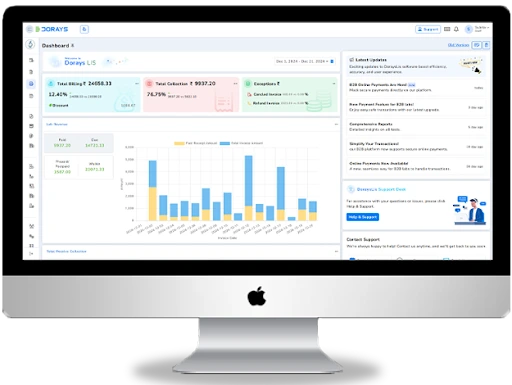
DoraysLIS is a laboratory information solution designed to help laboratories manage and automate their daily operations.
For a pathology lab, software such as DoraysLIS can help bring important activities together, including:
● Patient registration
● Test management
● Sample tracking
● Barcode management
● Result management
● Report generation
● Billing
● Inventory
● Laboratory workflow
● Analyzer connectivity
● Online reports
Instead of managing everything manually, a laboratory can use a digital system to keep its daily work more organized.